
TikTok Profile Picture Downloader
Save TikTok profile pictures in high quality with just a profile link using TikTok PFP downloader.
Your TikTok profile picture is one of the first things people notice on an account. Whether you’re saving your own avatar, keeping a copy of a public profile photo, or collecting design inspiration, taking a screenshot isn’t always the best option.
The TikTok Profile Picture Downloader on TTSave offers a simpler approach. Paste a public TikTok profile link into the tool, and it will prepare the available profile image for download. Everything works directly from your browser, so you can save profile pictures without installing extra software or creating another account.
How to Save a Profile Picture using TikTok PFP Downloader
Saving a TikTok profile picture only takes a few moments once you have the profile link.
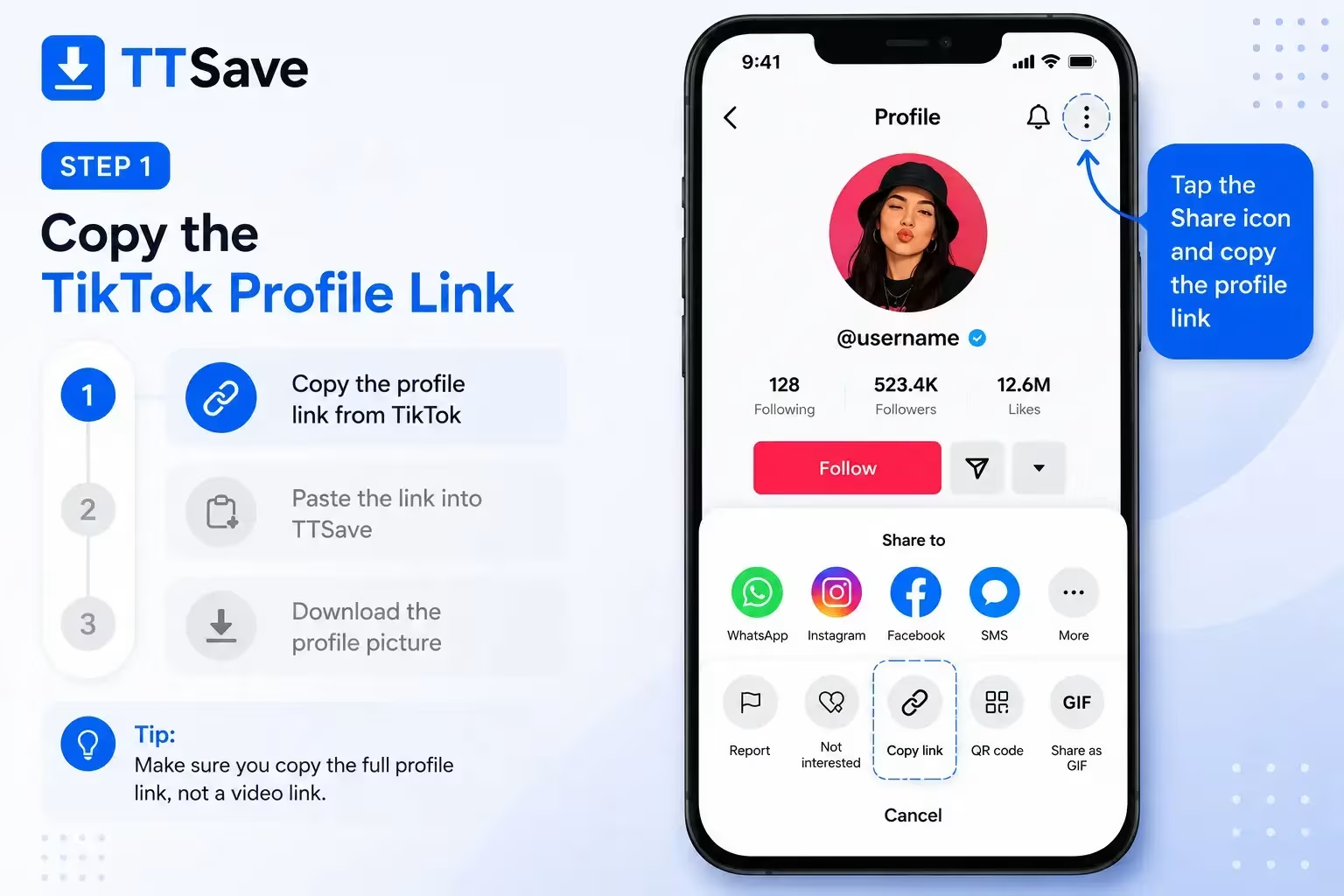
Step 1: Copy the TikTok Profile Link
Open TikTok and visit the profile whose picture you want to save. Copy the profile URL using the Share option or directly from your browser’s address bar.

Step 2: Paste the Link into TTSave
Open the TTSave TikTok Profile Picture Downloader and paste the copied profile link into the input field. The tool will locate the associated profile image.
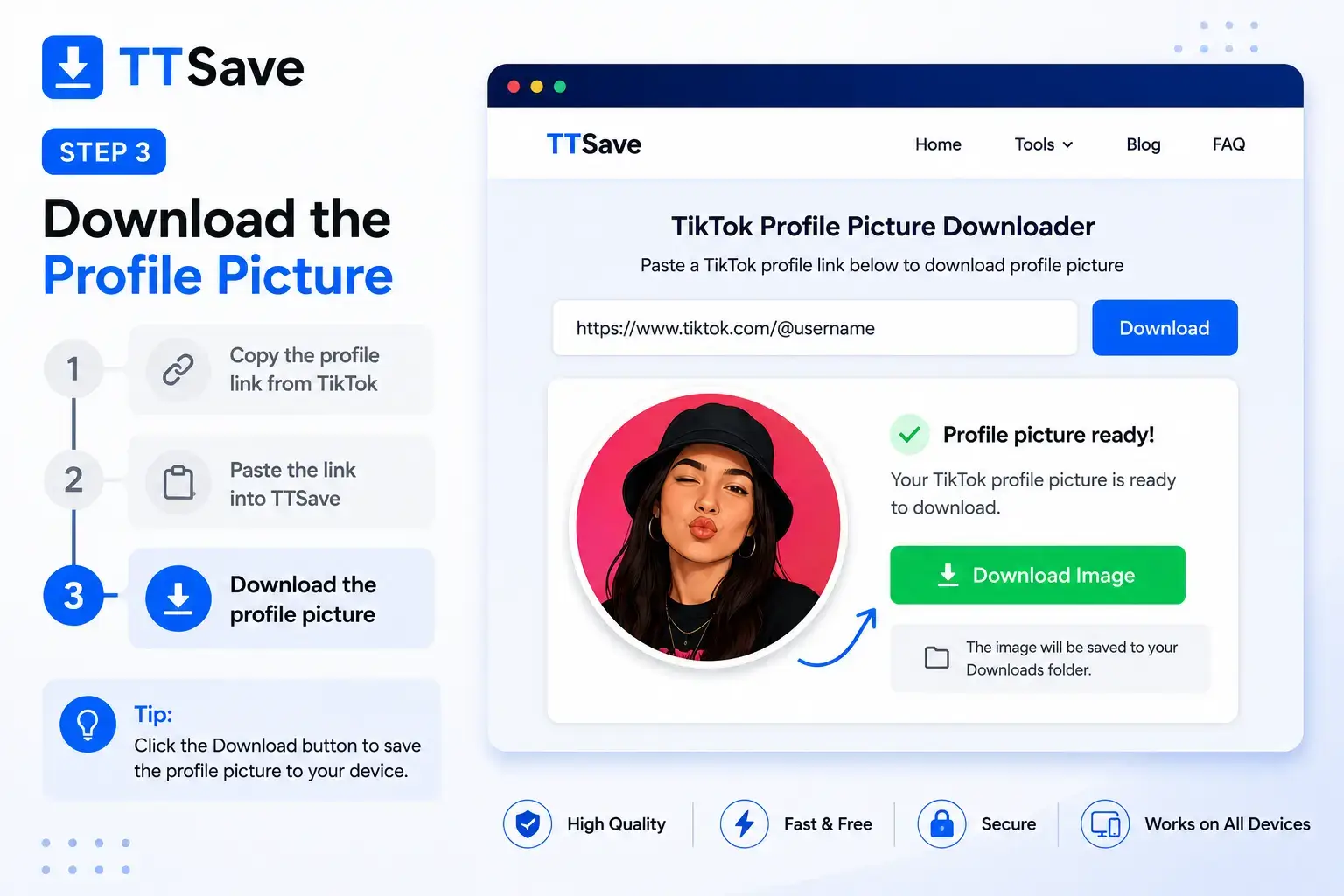
Step 3: Download the MP3 Audio
Once the profile picture is available, choose the download option and save the image to your device. You can then find it in your Downloads folder or photo gallery.
Why Use TTSave to Download TikTok Profile Pictures?
Download Profile Pictures in High Quality
Screenshots often reduce image quality and require additional editing. Using the profile link provides a cleaner way to save the available profile picture without cropping unnecessary interface elements.
No App Installation Required
Everything works in your browser. There’s no need to install another application just to save a public TikTok profile picture.
Works on Mobile and Desktop
The same process works whether you’re using Android, iPhone, Windows, macOS, or another device with a modern web browser.
Simple Profile Link-Based Process
You only need the TikTok profile URL. Paste the link into TTSave, and the tool prepares the associated profile image for download.
Fast and Free to Use
The downloader is designed to keep the process straightforward. Copy the profile link, submit it, and download the available image without unnecessary steps.
Clean and Easy Interface
The interface keeps the focus on the task itself. You won’t have to search through multiple menus before downloading a profile picture.
Download TikTok Profile Pictures on Any Device
Whether you use TikTok on a phone during the day or browse it from your computer at home, the process for saving a profile picture stays simple. Since TTSave works in your browser, you don’t have to switch between different apps or learn a separate workflow for each device.
On Android and iPhone, copy the profile link from the TikTok app and open the downloader in your preferred mobile browser. If you’re using Windows, macOS, or another desktop operating system, copy the profile URL from your browser and paste it into the tool.
The downloader is designed around the profile link rather than the device you’re using. As long as you can access the public TikTok profile, you can retrieve the associated profile picture without installing additional software.
Many users save profile pictures for personal reference, branding inspiration, contact identification, or to keep a copy of their own account photo before updating it. Whatever your reason, always respect the privacy of other users and avoid using downloaded images in ways that could violate copyright, platform policies, or someone’s personal rights.
Explore More TikTok Tools
TTSave includes additional tools for different types of TikTok content. If you’re looking for more than a profile picture, choose the tool that matches the content you want to save.
Frequently Asked Questions
Final Thoughts
Saving a public TikTok profile picture doesn’t have to be complicated. Copy the profile link, paste it into the TikTok Profile Picture Downloader, and download the available image in just a few steps.
Whether you’re keeping a copy of your own avatar or saving a public profile picture for personal reference, TTSave provides a straightforward browser-based experience that works across different devices. Always use downloaded images responsibly and respect the rights of the original account owner.