
TikTok MP3 Downloader
Convert TikTok videos to MP3 and save the audio directly from your browser.
TTSave is a free online TikTok MP3 Downloader that lets you convert TikTok videos into MP3 audio directly from your browser. Paste the link to a supported TikTok video, and you can extract its sound, music, or other audio content into an MP3 file without installing a dedicated app. The tool is designed for convenient use on smartphones, tablets, and computers, making it easy to save TikTok audio for personal listening or later access.
Whether you want to keep a song clip, save a trending sound, or separate the audio from a video, an online MP3 converter gives you a simple way to work with the audio you need.
How to Convert TikTok Video to MP3
Turning a TikTok video into an MP3 audio file only takes a few simple steps. The process starts with the video’s URL and ends with an audio file that you can save to your device.
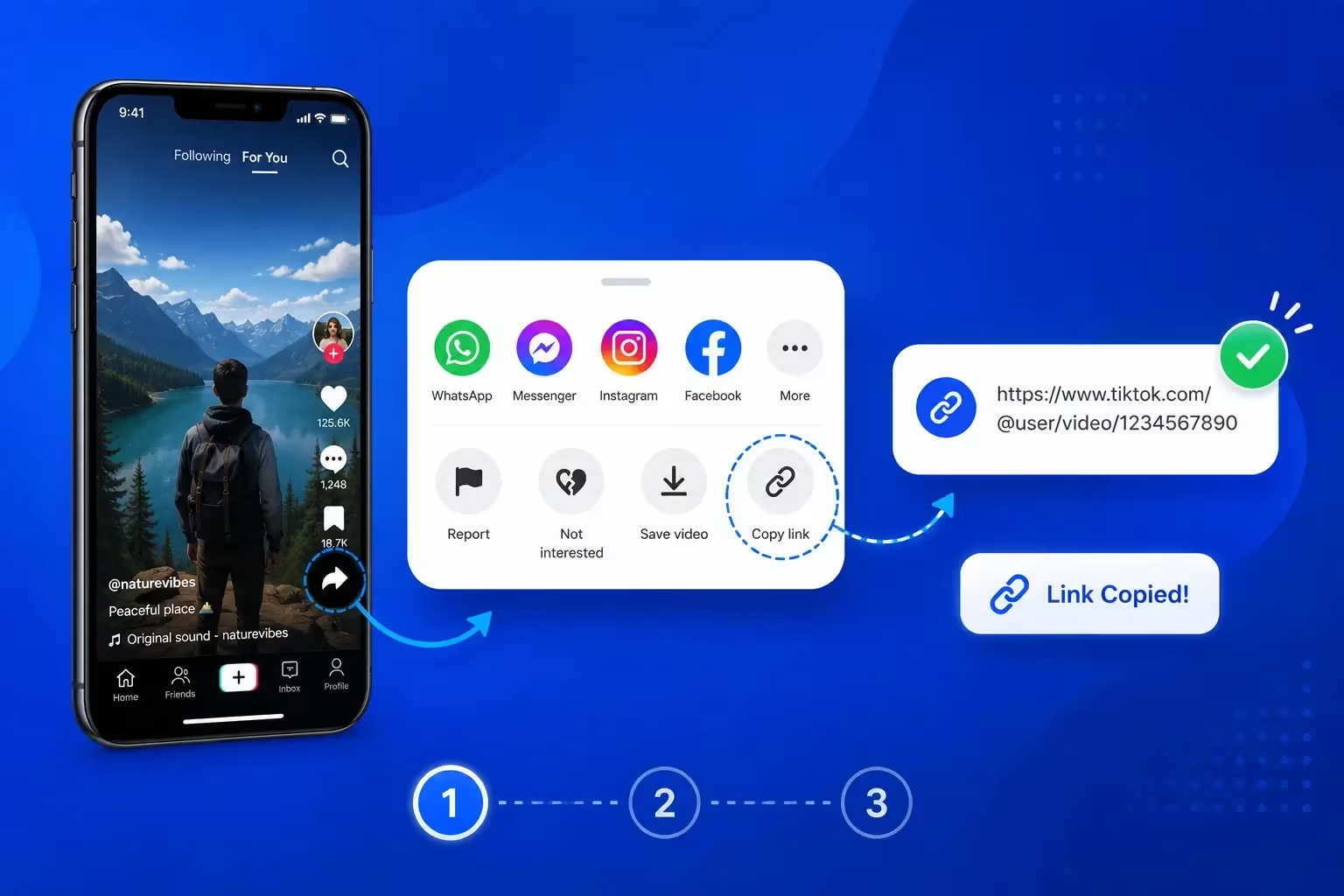
Step 1: Copy the TikTok Video Link
Open TikTok through the app or website and find the video containing the sound, song, or audio you want to save. Open the sharing options and copy the video link.
Make sure you copy the complete URL. If you copied it from a messaging app or another service, check the link before continuing so the correct content can be identified.
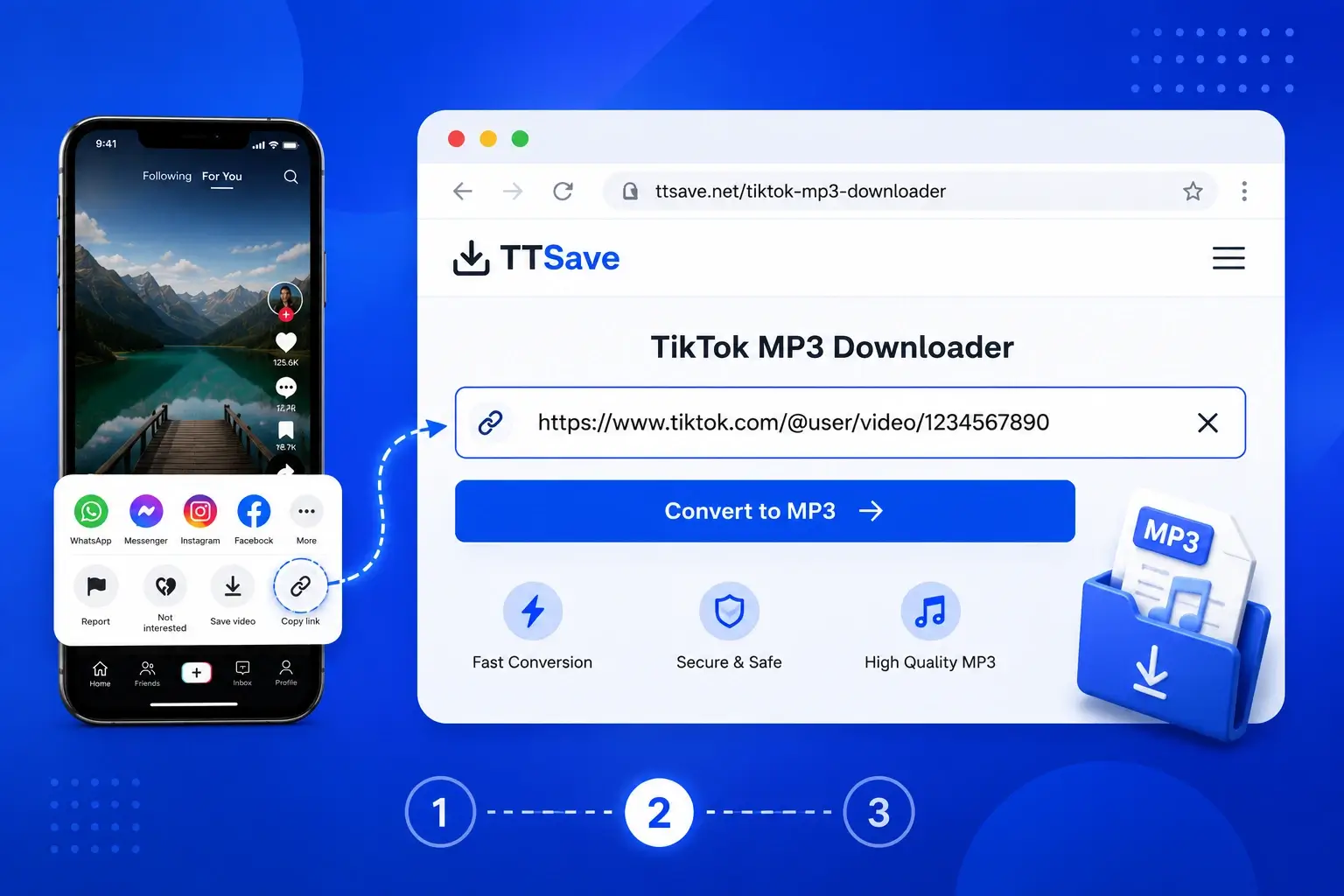
Step 2: Paste the Link into TTSave
Open the TikTok MP3 Downloader in your browser and paste the copied URL into the input field. The tool uses the link to locate the source content and prepare the available audio conversion option.
The process is based on the TikTok URL, so you do not need to search for the same content again inside the converter.
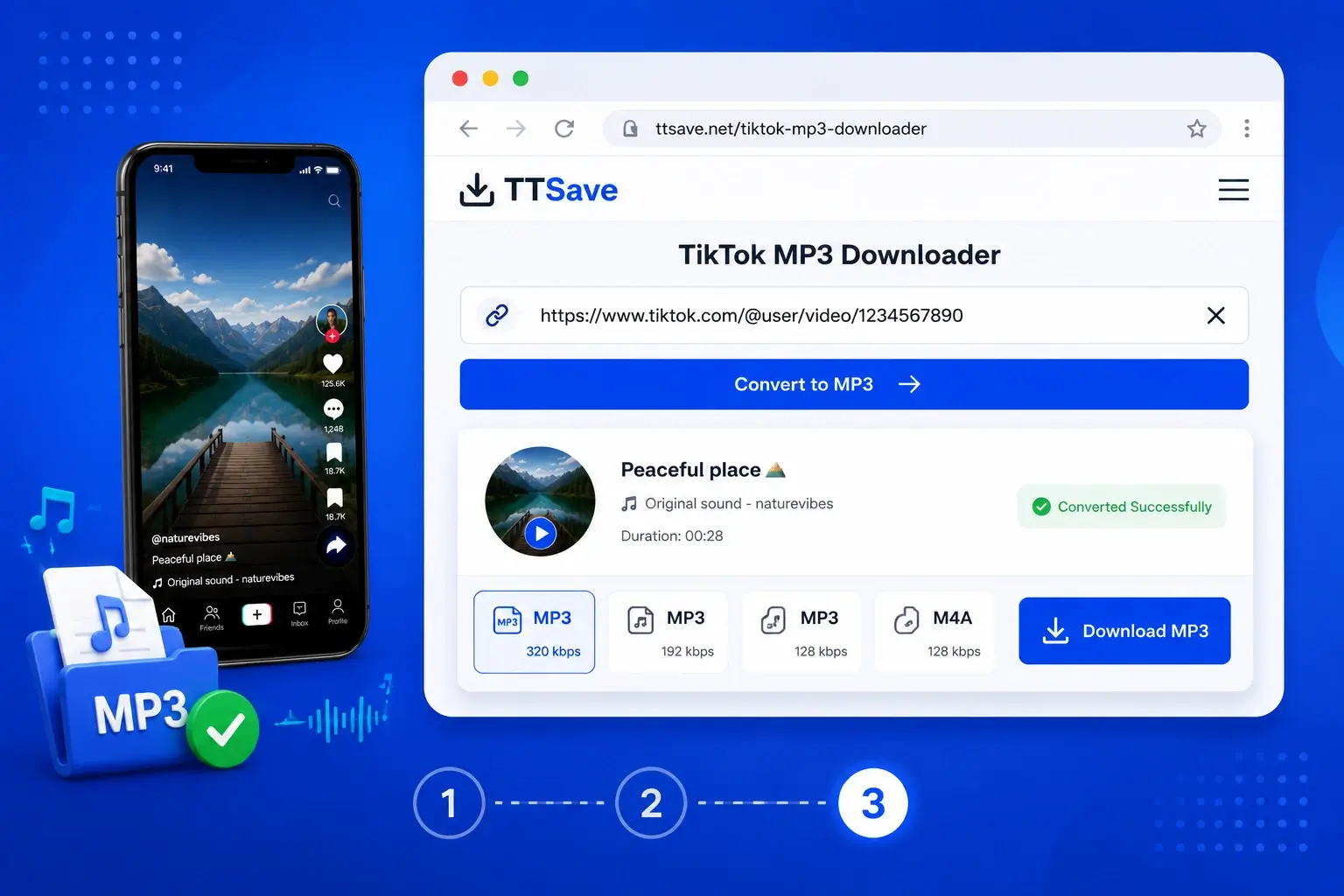
Step 3: Download the MP3 Audio
After the link has been processed, select the available MP3 conversion or download option. Once the conversion is complete, save the audio file to your device.
Your browser may place the downloaded file in its default downloads folder. On some devices, the file may instead appear in a media library or another location selected through your browser settings.
Why Use TTSave to Extract TikTok Audio?
A dedicated audio tool is useful when you want the sound from a TikTok video rather than the complete video itself. Instead of keeping a video file with visuals you may not need, you can focus on the music, sound, voice, or other audio contained in the original content.
Extract Audio from TikTok Videos
Some TikTok posts are mainly interesting because of their sound. A TikTok video to MP3 converter lets you focus on the audio portion and create an audio file from supported content.
Save TikTok Sounds and Music
TikTok is home to trending songs, viral sounds, short music clips, and spoken audio. If you want to keep a sound for personal listening or organize it with other audio files, converting it to MP3 can be more convenient than saving the entire video.
Use the Converter Online
You can access the tool through a browser rather than installing dedicated conversion software. This can be helpful if you only need to convert a few links or prefer not to add another app to your device.
Simple Link-Based Workflow
The process begins with a TikTok URL, keeping the conversion process straightforward. There is no need to manually search for the same video again once you have the link.
Access It from Different Devices
A browser-based tool can be used from supported smartphones, tablets, laptops, and desktop computers. The exact download experience may vary depending on your device and browser.
Get Audio Instead of Video
If your main goal is listening to the sound, an MP3 file may be more practical than a full video. It can also be easier to organize alongside other audio files on a compatible device.
Convert TikTok Videos to MP3 and Save the Audio Anywhere
TikTok content can include many different forms of audio, from music and songs to spoken clips and popular sounds. Converting supported content into MP3 gives you an audio-only file that can be stored and played on many commonly used devices and media players.
The process connects four main elements: the TikTok URL, source video, audio extraction, and MP3 conversion. Once you submit the link, the available conversion process can prepare the audio for download as an MP3 file.
This can be useful when you want to:
- Save a TikTok sound for personal listening
- Keep a short music clip in an audio-only format
- Store audio without keeping the full video
- Organize downloaded sounds in an audio library
- Access the file from a phone, tablet, or computer
You can also use the service from different platforms without changing the basic workflow. On Android or iPhone, you can copy the link from TikTok and switch to your browser. On Windows or Mac, you can use the same process from a desktop browser.
The resulting file size and audio quality depend on the source content and the conversion options available. Larger files generally require more storage space, while smaller files may be easier to store and transfer. Choose the available option based on how you plan to use the audio.
A browser-based converter can be especially convenient for users who want to save TikTok music without installing another app. However, downloading or reusing music and sounds does not transfer ownership. Always consider copyright, licensing, and the rights of the original creator before sharing or using downloaded audio publicly.
More TikTok Tools to Explore
TTSave includes additional tools for different types of TikTok content. Choose the one that matches what you want to do.
TikTok Video Downloader
Want to save the complete video instead of extracting its audio? Use the TikTok Video Downloader to download supported TikTok videos from a shared link.
View
TikTok Story Downloader
Looking for TikTok Story content? The TikTok Story Downloader is designed for users who want to save supported Story content.
View
TikTok Slideshow Downloader
If you want to save photos or image-based slideshow posts, the TikTok Photo & Slideshow Downloader provides a more suitable option for that content type.
View
TikTok Thumbnail Downloader
Need the cover image from a TikTok video? The TikTok Thumbnail Downloader lets you save supported thumbnails separately from the full video.
View
TikTok Profile Picture Downloader
Want to save a TikTok profile image? The TikTok Profile Picture Downloader is designed specifically for profile picture downloads.
View
Frequently Asked Questions
Final Thoughts
When you only want the audio from a TikTok video, converting it to MP3 can be more practical than saving the complete video. With TTSave, the process starts with a TikTok link and focuses on turning supported video content into an audio file you can save through your browser.
Copy the video URL, paste it into the MP3 downloader, and continue with the available conversion option. Whether you want to save a sound, music clip, or another type of audio, choose the format and download option that best suits your needs.
Always respect copyright and creator rights when downloading, storing, sharing, or reusing audio content.